Screenshots Are Not Evidence — Until You Document Them
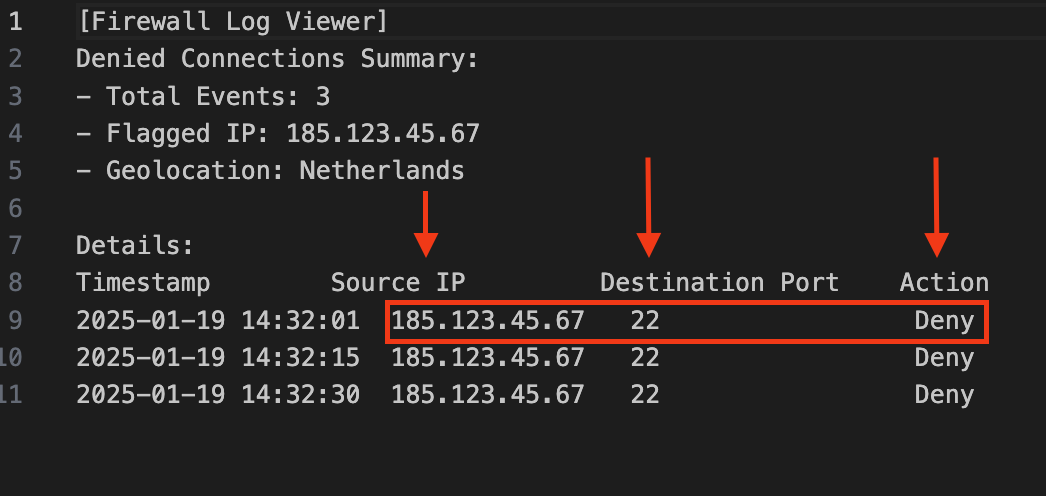
In cybersecurity, screenshots are often submitted as proof.
But a screenshot without explanation is not evidence.
It is a visual artifact with no analytical value.
Professional cybersecurity documentation requires structure, context, and interpretation. Whether you are conducting a vulnerability assessment, reviewing logs, analyzing firewall activity, or completing a lab assignment, your screenshots must function as defensible technical artifacts.
This article outlines the professional standard I expect in technical reporting.
The Problem: Screenshots Without Analysis#
Common issues in student and junior analyst reports:
- Images inserted without captions
- No explanation of what we are seeing
- No description of how the result was obtained
- No timestamps
- No tool versions
- No connection to findings
- No analysis
A screenshot should never force the reader to guess.
If I have to interpret the image myself, the documentation is incomplete.
The Professional Documentation Framework#
Use this structure for every screenshot in technical reporting.
1. Caption (Formal Figure Label)#
Each screenshot must include a descriptive figure label.
Example:
Figure 1: Firewall Log Showing Repeated Denied SSH Attempts
The title should state what the image demonstrates — not simply “Firewall Screenshot.”
2. Context and Purpose#
Explain:
- Why this screenshot is included
- What event, configuration, or control it represents
- How it supports the objective of the assignment or investigation
This section tells the reader why the image matters before they examine it.
3. Step-by-Step Methodology#
Document how the screenshot was generated.
Include:
- Tool name and version
- Navigation path
- Filters applied
- Commands executed
- Relevant configuration steps
Professional reporting must be reproducible. If another analyst cannot replicate your process, the documentation is insufficient.
4. Annotations and Observations#
Do not assume the reader will identify critical elements.
Explicitly call out:
- Source and destination IP addresses
- Ports
- Protocols
- Timestamps
- Status indicators
- Error messages
- Configuration values
Highlight visually and explain in writing.
5. Analysis#
This is where professionalism becomes evident. Do not describe, interpret.
Explain:
- Whether the activity represents expected behavior or an anomaly
- Why the pattern is significant
- What it confirms about security controls
- What risks remain
Screenshots support analysis. They do not replace it.
6. Technical Details#
Always include:
- Tool name
- Version number
- Log type or module
- Date and time (with timezone)
Precision builds credibility.
7. Redaction and Professional Presentation#
Before submitting:
- Remove unnecessary desktop clutter
- Crop to relevant sections
- Redact sensitive information
- Ensure image clarity
Professional documentation reflects professional discipline.
Example: Firewall Log Analysis (Assessment Excerpt)#
1. Control Objective
Verify that information flow enforcement controls prevent unauthorized inbound remote access attempts (e.g., SSH) and that enforcement is recorded in system security logs to support monitoring and response.
2. Evidence
Evidence Type: Firewall Log Extract
Log Source: Perimeter Firewall (Denied Connections Summary)
Observed Service: SSH (TCP/22)
Observed Action: DENY
Source IP: 185.123.45.67
Destination Port: 22
Geolocation: Netherlands
Timestamps (UTC):
  - 2025-01-19 14:32:01
  - 2025-01-19 14:32:15
  - 2025-01-19 14:32:30
3. Assessment Method
- Accessed firewall log viewer.
- Filtered for denied inbound connections targeting TCP/22.
- Reviewed event frequency and repetition from a single source.
- Validated action status and timestamp integrity.
- Mapped evidence to control objective (information flow enforcement).
4. Analysis
The log indicates repeated inbound SSH connection attempts at short intervals (14–15 seconds) from a single source IP. The firewall action is recorded as DENY for each attempt. This supports that the perimeter enforcement control is functioning as intended for unauthorized inbound SSH traffic.
Pattern characteristics (short interval, repetition, single source) are consistent with automated access attempts (credential enumeration). No evidence of successful session establishment is present in the provided excerpt.
5. Finding
Statement: Unauthorized inbound SSH attempts were detected and blocked at the perimeter.
Condition: Repeated denied inbound connections to TCP/22 from 185.123.45.67.
Criteria: NIST SP 800-53 Rev. 5 — AC-4 (Information Flow Enforcement).
Cause: External automated access attempts targeting a common remote management service.
Effect: Attempts were blocked; residual risk remains if management access is broadly exposed.
6. Recommended Corrective Actions
- Restrict SSH exposure to approved management IP ranges.
- Disable password-based authentication; enforce key-based authentication.
- Implement rate-limiting and automated blocking for repeated denied attempts.
- Enable alerting thresholds for repeated denied inbound SSH activity.
7. Assessor Notes
Assessment Result: CONTROL EFFECTIVE (for observed condition)
Evidence Sufficiency: ADEQUATE (single-source excerpt; broader trend analysis not included)
Follow-on: Review SSH exposure across perimeter; confirm MFA / bastion host strategy if applicable.
What Professional Reporting Looks Like#
A properly documented screenshot should demonstrate:
- Evidence collection
- Analytical reasoning
- Control validation
- Reproducibility
- Risk assessment
This is the difference between submitting images and submitting analysis.
If you are preparing for professional cybersecurity roles, begin documenting your work at this level now.
Your reports should reflect the standards of a security analyst — not just a student completing a lab.